Hoodsly Connector
A Shopify app that makes another company's catalog behave like the store's own. It imports HoodslyHub's products into Shopify, lets a shopper configure them past the three options Shopify gives you, sends the resulting order back to HoodslyHub to fulfil, and writes the tracking URL that comes back onto the Shopify order — so the merchant only ever looks at one admin.
- Platform ceiling
- 3 product options → 30+
- App review
- Published, incl. billing exemption
- Distribution
- Public app, unlisted
- Order loop
- Placed → fulfilled → tracked
Two systems, one order, and a product Shopify can't describe.
Hoodsly builds made-to-order range hoods — two-thousand-dollar pieces of kitchen millwork that are specified, not picked off a shelf. The catalog, the pricing rules, the production queue and the shipping all live in HoodslyHub, their own platform, not Shopify. What the client wanted was for a Shopify store to sell that catalog as if it were its own: browse it, configure it, buy it, and get a tracking number, without the merchant or the shopper ever knowing a second system exists.
Two things make that harder than a product feed. First, one of these products is not three dropdowns — colour, finish, size, ventilation and more, over six independent option dimensions before you count the choices inside each one, some of them changing the price and some of them changing which options come next. Shopify's product model stops at three options. Second, the order does not end when Shopify says it does: it has to travel to HoodslyHub, get built and shipped there, and come back with a tracking URL that lands on the right Shopify order. Every one of those hops is a place for the two systems to lose each other.
Why this is a public app and not a custom one.
The obvious build is a custom app: one client, one store, no app review, ship in a fraction of the time. I argued against it, because the roadmap made it a trap. HoodslyHub was signing on new partner stores — each one a different Shopify store that needed the same connector.
A custom app is bound to the store it was created for. Serving five partners that way means five installations of the same logic drifting apart, five sets of credentials, and a bug fix that has to be applied five times and verified five times. A public app distributed unlisted gets the opposite shape: one codebase, one release, each new partner store installs it, and nobody sees it in App Store search because it is not meant for them. The cost was going through Shopify's app review. That cost is paid once; the custom-app tax would have been paid on every partner, forever.
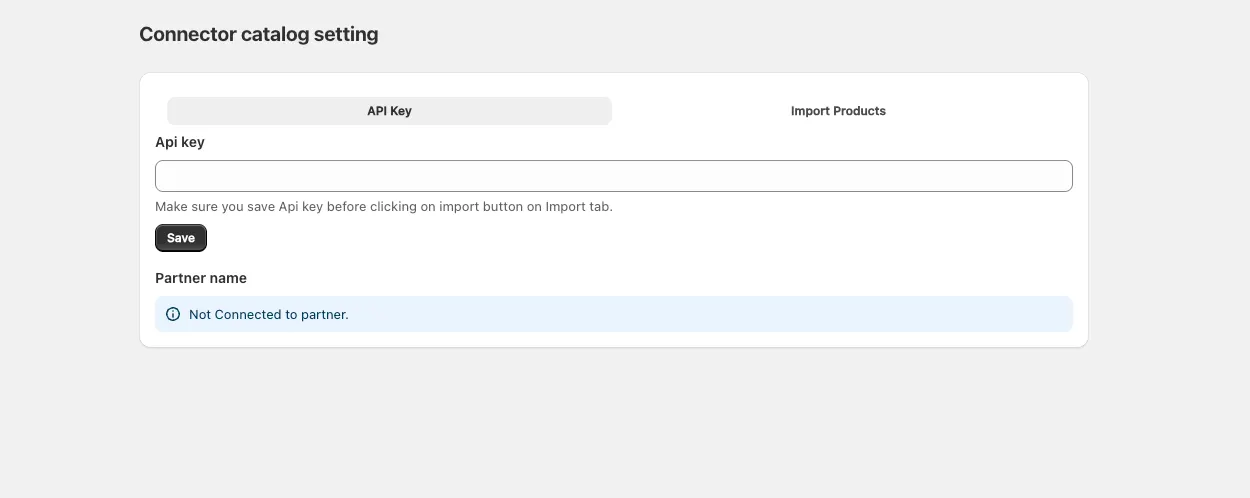
What makes one build serve any partner is that partner identity is data, not code. The whole onboarding is the screen below: the merchant pastes the API key HoodslyHub issued them, the app resolves which partner that key belongs to and says so, and only then does the Import Products tab have anything to import. Nothing about a partner is compiled in, so adding the next store is an install and a key — not a branch.
A round trip, not an import.
The app owns a full loop rather than a one-way sync. Products come in from HoodslyHub, orders go back out to it, and fulfilment data returns to Shopify — with the app holding the mapping that keeps a Shopify order and a HoodslyHub order recognisable as the same order at every step.
- Catalog import. HoodslyHub products, with their full option trees, pulled into Shopify as real products the theme can merchandise normally.
- Storefront configurator. A React theme app extension renders the option set for whatever product the shopper is on — dynamically, so a new option added upstream needs no theme edit and no developer.
- Configuration-aware cart. The chosen configuration travels through add-to-cart as line item properties and survives onto the order intact.
- Order forwarding. A Shopify order webhook fires, the app reconstructs the configuration, and submits the order to HoodslyHub for production.
- Fulfilment write-back. HoodslyHub fulfils and returns a tracking URL; the app attaches it to the matching Shopify order, so the merchant's admin and the customer's shipping email are both correct without anyone copying a number by hand.
The moving parts, and where each one bites.
Past the three-option ceiling
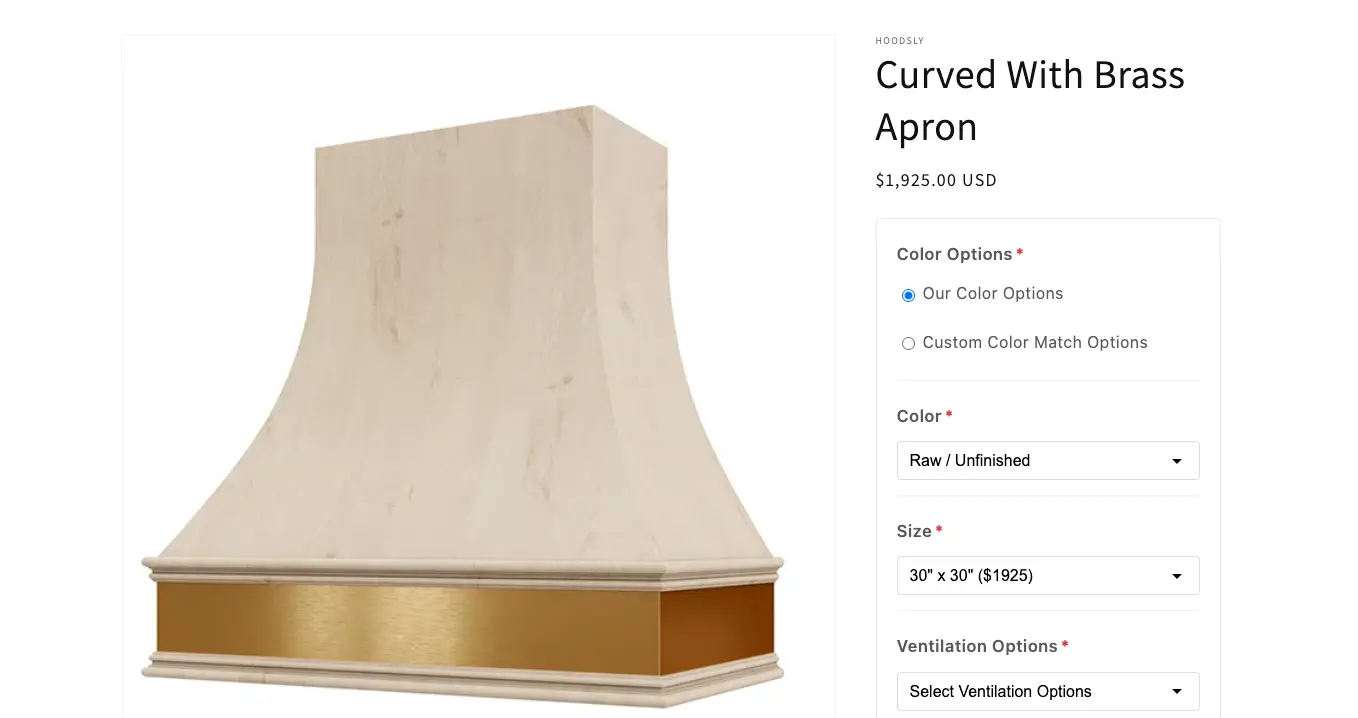
Shopify allows three options per product. A Hoodsly product routinely needs more than six option dimensions and, once you count the choices inside them, 30+ configuration options — so the native model cannot hold the product at all, and forcing it into variants would explode the variant count into the thousands for combinations nobody will ever order. So the option tree lives in the app instead, in its own schema, and Shopify holds the sellable product while the app holds what the product can actually be. The extension reads that schema at render time, which is why adding an option upstream is a data change rather than a deploy.
Why it had to be a theme app extension
An option tree the platform doesn't know about also can't be rendered by the platform. Shopify's native variant picker only knows how to draw the three options it owns, so the configurator had to become a theme app extension — an app block the merchant drops into the product template, rendering from the app's schema rather than from the theme's product object. That choice is what keeps the app installable: no theme fork, no Liquid edits in a partner's store, nothing that a theme update can silently undo, and one storefront surface that behaves identically everywhere it's installed.
It also has to be a real form, not a display. The options are required and validated before the shopper can add to cart, choices are conditional — picking Custom Color Match Options instead of Our Color Options changes what renders beneath it — and size carries its own price, so the extension resolves the running total from the option schema as the shopper builds the product.
Getting a configuration through the cart intact
An option tree that Shopify doesn't know about still has to reach the order, because the order is what gets manufactured. The configuration is written onto the cart line as line item properties at add-to-cart, which is the one channel that carries arbitrary per-line data all the way from the storefront into the finished order. Getting that right meant treating the property payload as a contract — stable keys, values that survive a customer editing the cart, and a shape HoodslyHub can consume without a translation layer guessing at intent.
Keeping two order systems pointed at each other
Shopify and HoodslyHub each mint their own order identity, and once the order is in production every later message — a status change, a fulfilment, a tracking URL — arrives keyed to the wrong one. The app keeps both sides addressable: the Shopify order number travels with the order into HoodslyHub, order metafields and line item properties hold the return path, and either system can be queried from an identifier the other one owns. That correlation is unglamorous and it is the whole reason tracking lands on the right order instead of a plausible-looking neighbour.
Publishing it, with payment happening outside Shopify
This was the part that nearly stopped the project. Shopify expects a public app to charge merchants through Shopify Billing — but here the store owner pays the client directly, outside the platform, and no amount of code makes that fit the default rule. The app needed an explicit exemption from Shopify Billing, which is granted case by case and carries an ongoing condition: the client reports the outside-Shopify revenue to Shopify every month. On top of that, an app that sources products from a third party gets read closely against Shopify's product-sourcing requirements. I ran the review cycle as primary contact — making the case for the exemption, answering the sourcing questions, and turning around the review feedback until it was approved and published.
What shipped.
- Published on Shopify — built from an empty repository and taken through app review to approval, unlisted so distribution stays the client's to control.
- Billing exemption approved, with the monthly reporting commitment that came attached to it.
- 30+ configuration options sellable on products Shopify's own data model cannot describe.
- The order loop closed end to end — placed in Shopify, produced and fulfilled in HoodslyHub, tracking URL back on the Shopify order automatically.
- 75% less merchant setup time, from custom storefront blocks replacing manual theme work.
- One codebase for every partner store, so onboarding the next partner is an install rather than a fork.
The hard part wasn't the code.
Most of what made this project difficult sat outside the editor: choosing a distribution model for stores that did not exist yet, modelling a product the platform refuses to represent, and arguing a payment arrangement through a review process built to reject it. The engineering — extension, webhooks, correlation, write-back — was the part I could control. The rest was scoping the problem honestly and then staying on it until a platform said yes.
It is a smaller system than FlexSync, and I lead with that one for good reason. This is the project I point at when the question is about judgment and about shipping through someone else's constraints rather than my own.
Want the detail?
Happy to walk through the option schema, the cart contract, or the app-review process.